Core metrics
CSAT, NPS, and CES on one screen, with sample size and the meaning of each number.
CX Card
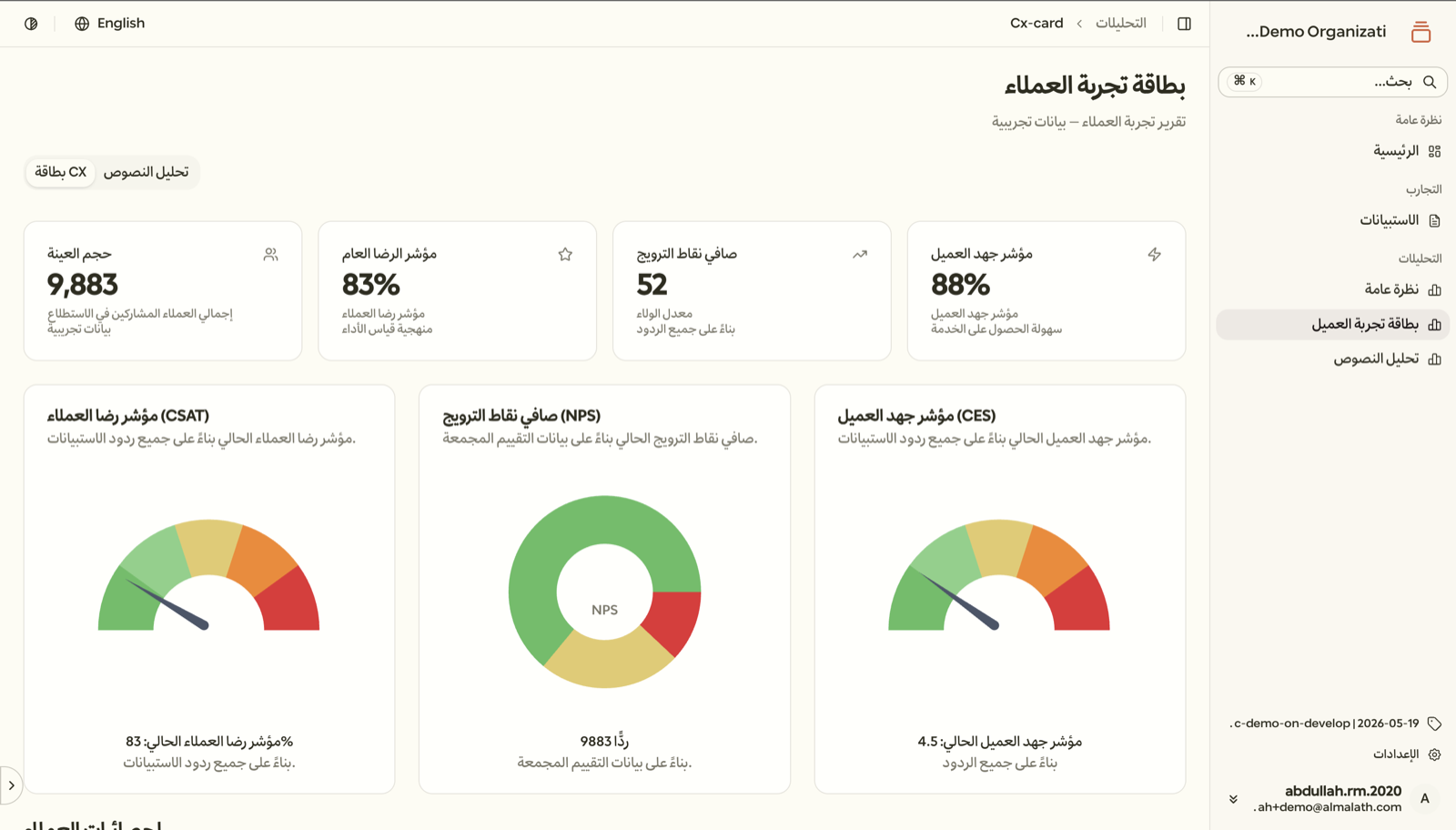
The CX Card summarises your measurement results on one screen: the core metrics, the sample size, what each number means, and what to do next.
CX Card
Measurement results lose their impact when they stay in spreadsheets and reports only specialists read. Decision makers need a short picture they can trust.
The card shows metrics with their context: how many people took part, what the number means, and which themes kept coming up in customers' own words, so decisions rest on clear evidence.
CSAT, NPS, and CES on one screen, with sample size and the meaning of each number.
Themes and sentiment drawn from open-ended answers that explain what sits behind the numbers.
Suggested next steps ranked by priority and based on the measurement results themselves.
The card is built from your measurement data in Rihla, so there is no manual report to prepare each time.
Connect your measurement tool to the touchpoints in your customer journey and start collecting responses.
Follow CSAT, NPS, and CES with the sample size for every measurement.
See the recurring themes and sentiment in written responses.
Present the card to your team and agree on improvement priorities together.
Start measuring in Rihla and get a CX Card built directly from your own data.